

GM Transmission Calibration Studio
Generate shift tables, TCC lockup tables, and TCM line-pressure tables for every GM auto trans from 1996 to current. One click to copy. One paste into HP Tuners VCM Editor.
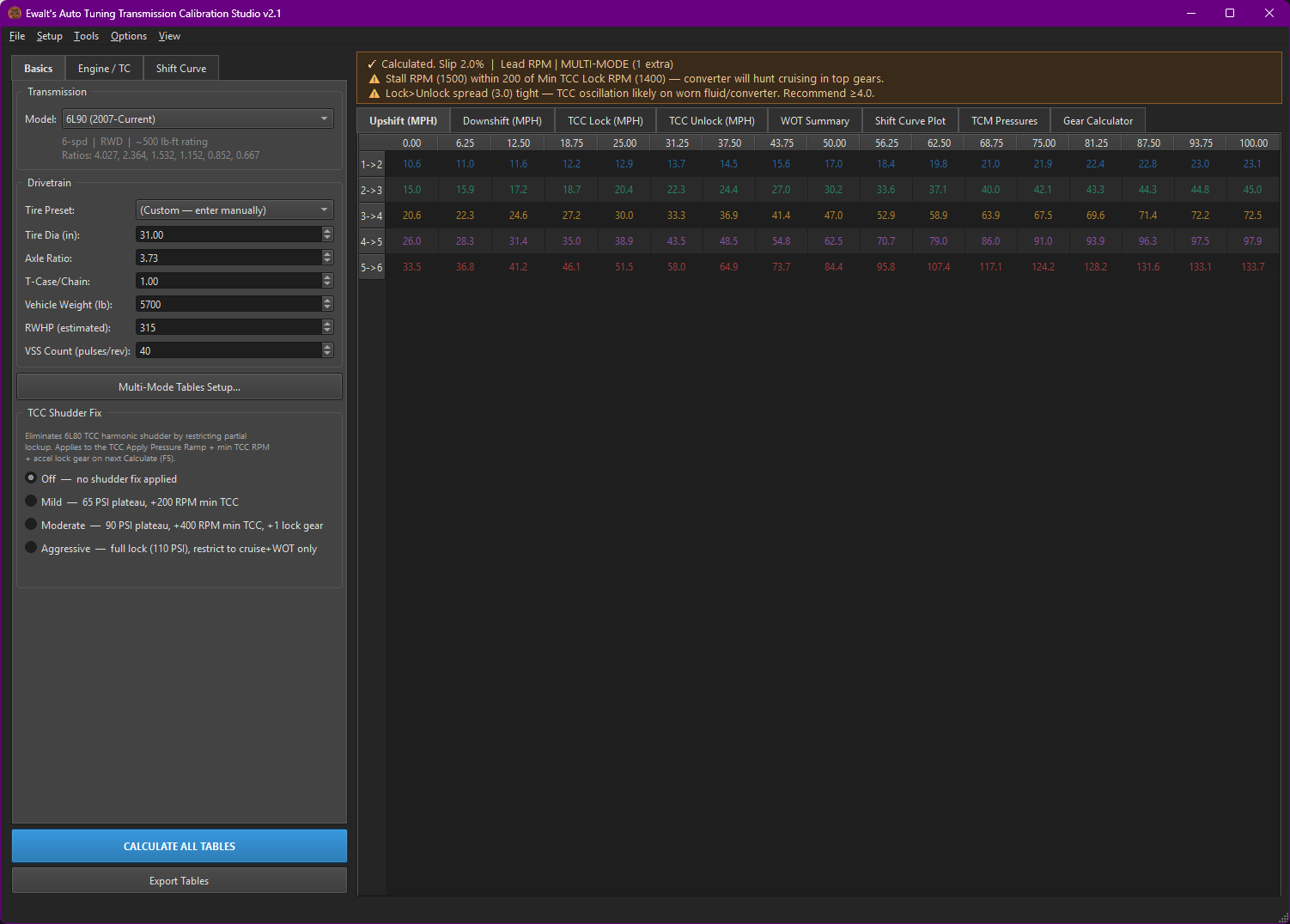
Everything you need to calibrate a GM auto trans
From single-table shift point math to full TCM pressure schedules, multi-mode tune sheets, and dyno log validation. Nothing else to buy.
Shift & TCC Tables
Upshift, downshift, WOT shift speed and RPM, plus TCC Lock and Unlock tables. Sized automatically per gear count, with iterative spread enforcement (up to 32 passes) so your tables never violate minimum MPH gaps.
TCM Pressure Tables
Base Shift Pressure, TCC Apply, Coast Pressure, and Garage Shift tables for 6L80, 8L90, 10L80 family. For 4L60E and 4L80E: Base Shift Pressure, Desired Shift Time, and TCC DC Maximum.
Multi-Mode Setup
Performance / Hot Trans / Cruise for 4-speeds, or Pattern A / Hot Trans / Pattern B for 6+ speeds. Intent presets for Racing, Towing, Eco, Hot ATF Protection — fully editable, save your own.
Log Import & Validation
Drop a VCM Scanner, EFILive, or CSV log. Auto-detects columns, extracts measured shift points, stall RPM, WOT slip %, ATF temp range. Compares against tool predictions. Pandas backend for 10-50× faster parsing.
Performance Simulator
Newton-integration vehicle dynamics. 0-30, 0-60, 0-100, 0-120, 1/8 mile, 1/4 mile predictions with shift-point timing analysis. Tunable Cd×A, Crr, launch grip, drivetrain efficiency.
Reverse Import
Paste an existing upshift table. The solver back-fits the Factor / Offset / Up Firmness / Shift RPM that produced it. Clone known-good tunes, migrate between PCMs, reverse-engineer OEM behavior.
Tune Sheet Reports
HTML report with config snapshot, all tables, validation findings, inline SVG plots. PDF tune sheet for customer hand-off with vehicle/tuner metadata, every table, and the performance prediction.
Profile Comparison
Load a second profile, get side-by-side table diffs with mean, min, and max delta per shift table. Color-coded cells by delta magnitude. Document before/after, A/B test intents, audit changes.
Live Preview
Ctrl+L enables debounced auto-recalc. Every spinbox change triggers a fresh table render in <500 ms. Iterate on Factor, Offset, and Spreads without touching F5.
Every GM auto trans from 1996 to current
RWD, FWD, Allison, and Aisin. Ratios are pre-loaded; just pick the trans and the tool sizes every table to match.
- 4L60E (1993-2013)
- 4L65E (2001-2013)
- 4L70E (2006-2013)
- 4L80E (1991-2013)
- 4L85E (2002-2013)
- 6L45 (2007-2013)
- 6L50 (2007-current)
- 6L80 (2006-current)
- 6L90 (2007-current)
- 8L45 (2015-current)
- 8L90 (2014-current)
- 10L80 (2017-current)
- 10L90 (2017-current)
- 4T40E (1995-2005)
- 4T45E (1997-2011)
- 4T60E (1991-1999)
- 4T65E (1997-2009)
- 4T65E-HD (2000-2009)
- 4T80E (1993-2005)
- 6T30 (2010-current)
- 6T40 (2008-current)
- 6T45 (2008-current)
- 6T50 (2008-current)
- 6T70 (2007-current)
- 6T75 (2007-current)
- Allison 1000 5-Spd
- Allison 1000 6-Spd
- Aisin AS6 (6-Spd)
- Aisin AS69 (6-Spd HD)
From blank to clipboard in 5 minutes
A real workflow: pick a starter profile, adjust three numbers, calculate, paste.
Load a Starter Profile
File → Load Preset — pick the closest match.
LS1 Camaro, LS3 SS, LT1 C7, ZL1, 5.3 truck, L87 Silverado,
LBZ or L5P Duramax.
Adjust the Drivetrain
Tab 1: tire diameter, axle ratio, vehicle weight. Everything downstream scales from these three.
Set the RPM Envelope
Tab 2: shift RPM, stall RPM, Min TCC RPM, accel and WOT lock gears. The validation banner flags overrev risk and TCC hunt conditions.
Calculate & Validate
Press F5. Tables generate, the heatmap renders, the validation banner reports any issues. Fix the warnings, recalculate.
Export to HP Tuners
Press F6. The export dialog stays on top. Pick the TCM era (07-13 combined or 14+ separate). Click Copy Table.
Paste & Save
Switch to VCM Editor, click the top-left cell of the matching TCM
table, Ctrl+V. Repeat per table. Save the .hpt
file. Flash it. You're done.
Built on real math, not lookup tables
Every table cell is derived from the underlying physics: gear ratios, tire dynamics, converter slip, and shift execution latency.
Common questions
Which GM transmissions are supported?
Does it work with HP Tuners VCM Editor?
Can I import existing dyno logs to validate my tune?
Is a torque curve required?
What's the difference between RPM mode and Time mode for WOT lead?
What computer specs do I need?
Will it generate Multi-Mode tables (Tow/Haul, PAL, etc.)?
Can I reverse-engineer an existing tune's parameters?
What output formats does it produce?
Get Transmission Calibration Studio v2.1
Built for GM tuners. Maintained by Ewalt's Auto Tuning. Direct paste workflow for HP Tuners VCM Editor.
Download v2.1 →