


GM Stock & Tuned PCM Calibration Files
Free repository of stock and modified GM calibration files. Download tune files or learn how to verify if your PCM calibration has been modified from the factory flash.
Download Calibration Files
Modified Tunes
Community-uploaded calibrations. Not verified — use at your own risk.
Browse Modified FilesContribute Your Tune Files
Have a stock read or a tune you'd like to share? Upload it to the repository.
Upload Tunes HereHow to Check If Your GM Calibration Is Stock or Modified
Every GM PCM stores calibration part numbers and a corresponding Calibration Verification Number (CVN) — a checksum of the calibration data. If the calibration has been altered from the factory flash, the CVN will no longer match what GM has on file. You can verify this using HP Tuners and GM's free TIS2WEB SPS Information tool.
Copy Your VIN from HP Tuners
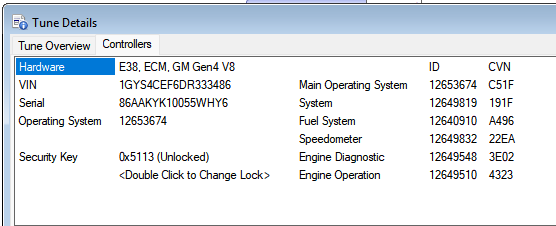
Open your tune file in VCM Editor. Go to Edit > Calibration Details (or press Ctrl+D). The VIN is displayed at the top of the window. Copy the full 17-character VIN. You'll also see a list of calibration part numbers and their corresponding CVNs — these are what you'll be comparing.
Look Up Your Calibration IDs on TIS2WEB
Go to https://www.acdelcotds.com/subscriptions# — this is GM's free public tool for looking up factory calibration information by VIN.
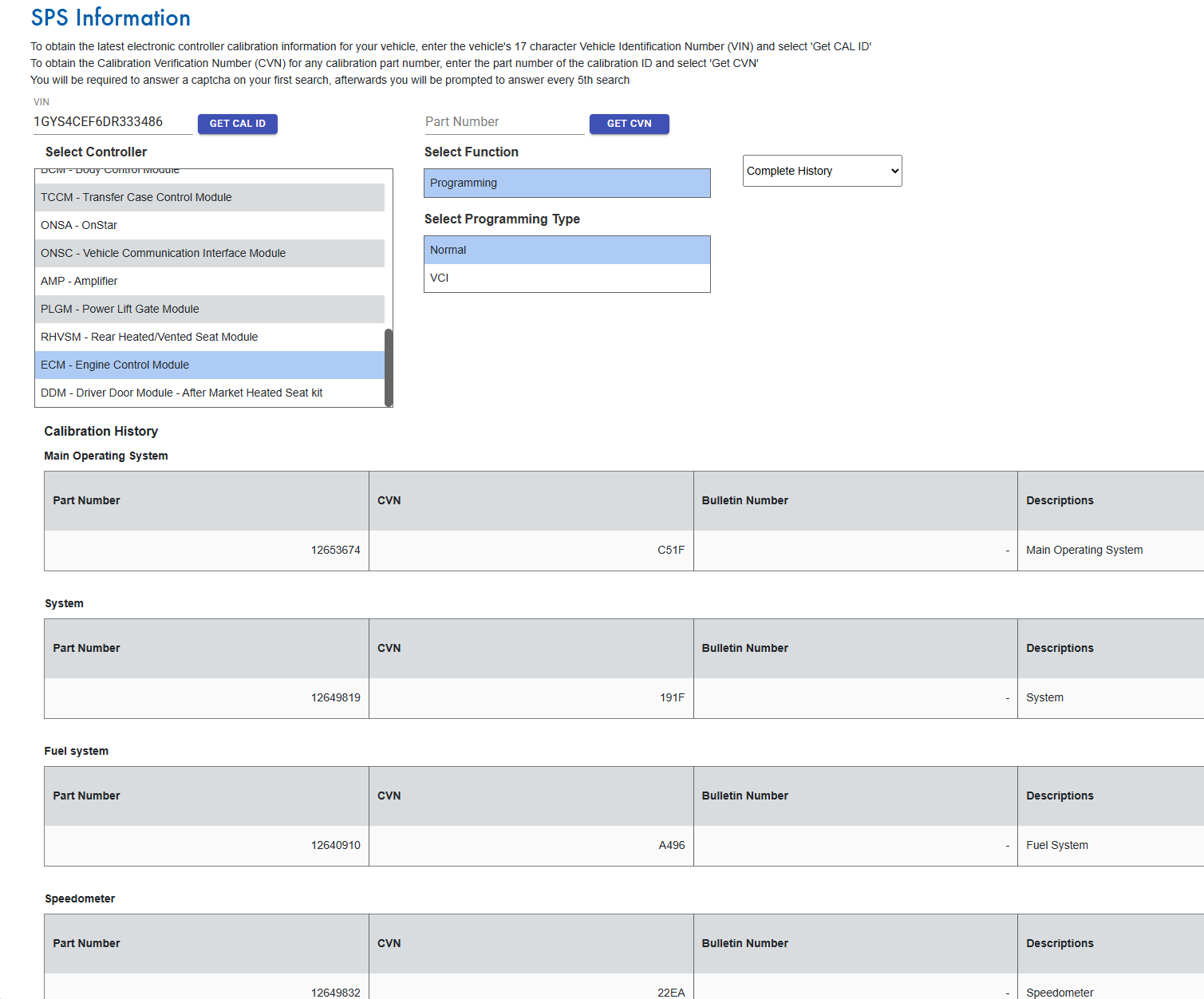
Enter your 17-character VIN and click Get CAL ID. You'll be prompted to select a controller — choose PCM/VCM – Powertrain/Vehicle Control Module. Under Select Function, pick Programming, and under Select Programming Type, pick Normal.
TIS2WEB will display the full calibration history for your PCM, broken out by segment: Main Operating System, System, Fuel System, and Control Module. Each segment lists its calibration part number and factory CVN.
Compare Calibration Part Numbers and CVNs
Match each calibration part number from HP Tuners against the corresponding entry on TIS2WEB. Check that the CVN for each part number is identical.
Any CVN mismatch? → That calibration segment has been modified. The tune is not stock. The part number tells you which calibration segment was changed (system, fuel, transmission, etc.), and the mismatched CVN confirms the data in that segment has been altered.
Note: GM may release updated calibrations over the life of a vehicle (TSBs, reflashes at the dealer). TIS2WEB shows the full history, so a mismatch against the latest entry doesn't necessarily mean aftermarket tuning — it could mean the vehicle was never updated to the most recent factory calibration. Compare against all history entries, not just the first one.
Frequently Asked Questions
What is a CVN (Calibration Verification Number)?
A CVN is a checksum that GM calculates from the calibration data stored in a specific segment of the PCM. Each calibration part number has a corresponding CVN. If the calibration data changes — even a single byte — the CVN changes. This is how GM (and you) can verify whether a calibration matches the factory programming.
What's the difference between an HPT and a BIN file?
An HPT file is HP Tuners' proprietary format. It wraps the raw calibration data with metadata — VIN, OS ID, licensing credits, and tuner notes. It can only be opened in HP Tuners VCM Suite.
A BIN file is a raw binary image of the PCM's calibration memory. It's a universal format that works with TunerPro, EFILive, and other tools. BIN files don't contain metadata — just the calibration bytes as they exist in the PCM.
I have an HPT file but need a BIN — can you convert it?
Yes. An HPT can't be directly "converted" to a BIN by just extracting data, but the calibration can be written to a physical PCM and then read back as a raw binary dump. If you have an HPT and need a BIN, Contact Us and I can write your tune to one of my bench PCMs and read it back as a BIN file.
Which GM platforms are covered?
The repository includes files across a range of GM PCM platforms including E38, E92, P59, P12, and others. Coverage depends on what's been contributed. If you have stock reads from a platform that's not well-represented, consider uploading them.
How do I know which OS my PCM is running?
In HP Tuners, the OS ID is shown in the Calibration Details screen (Edit > Calibration Details) and also in the title bar of VCM Editor when a file is open. The OS ID is the foundation of the calibration — all part numbers and tables are tied to a specific OS.
Need Help With Your GM Tune?
Ewalt's Auto Tuning specializes in GM ECU/PCM tuning, module programming, and calibration work that dealerships say can't be done.
Get in Touch